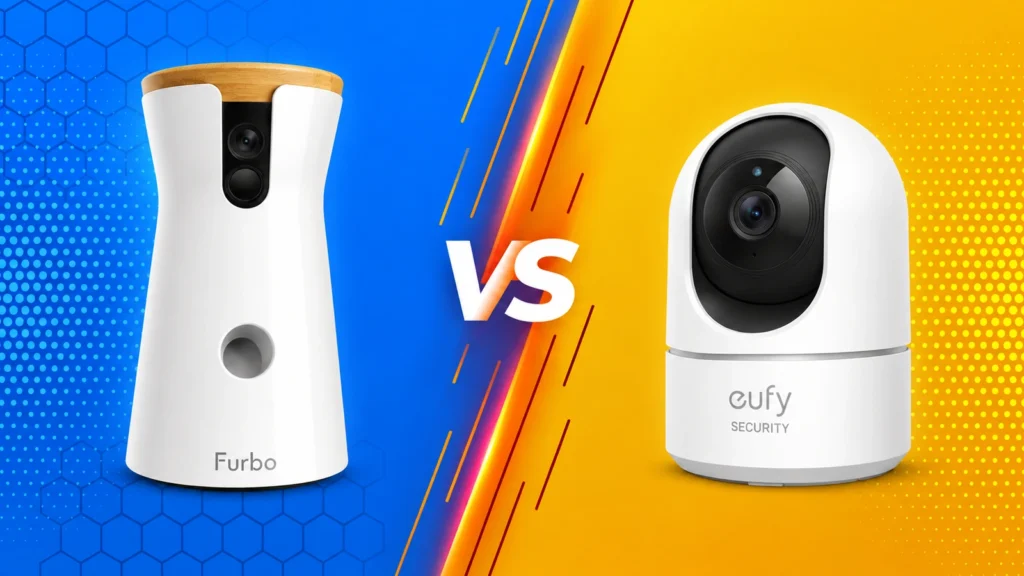
The best dog cameras can answer the small questions that nag at you after you leave home: Is your dog sleeping, pacing, barking, or getting into something unsafe? The best models make that check-in quick. They give you a clear view of the room, dependable alerts, and two-way audio without turning every movement into an emergency notification.
A camera is most useful as a window into your dog’s routine, not as a substitute for company, exercise, training, or veterinary care. Some dogs settle when they hear their person’s voice through a speaker. Others become more alert or confused. Start quietly, watch your dog’s response, and use only the features that genuinely help.
Quick answer: The eufy Security Indoor Cam E220 is the stronger value for straightforward monitoring, with 2K video, pan-and-tilt coverage, motion tracking, and local-storage options. The Furbo 360° Dog Camera costs more but adds dog-focused features such as barking alerts and treat tossing. Choose based on the room you need to see and the features you will actually use, not the longest feature list.
What to Look for in a Dog Camera
Start with the room, not the camera. A fixed wide-angle model may be enough for a crate, entryway, or small living room. A pan-and-tilt camera is more useful when your dog moves between a bed, doorway, and window. Place the camera high enough to reduce blind spots but low enough that furniture does not block the view.
Video resolution matters less than marketers suggest once you reach a clear 1080p image. Good low-light or night vision, reliable Wi-Fi, and a stable app usually matter more. If you want to check whether your dog is limping, chewing a paw, or breathing comfortably, the image must stay clear when you zoom. A rotating camera can help, but automatic tracking should be easy to disable if constant movement bothers your dog.
Two-way audio sounds reassuring, yet it is not automatically calming. Test it while you are still nearby. If your dog searches frantically for you, barks at the speaker, or becomes more restless, use the microphone only for listening. Treat dispensers can create a positive association with the device, but they require correctly sized dry treats and regular cleaning. They are a bonus rather than a reason to ignore video quality, privacy settings, or ongoing fees.
Check storage before buying. Some cameras save only short cloud clips unless you pay for a plan. Others accept a microSD card or work with a local hub. Decide whether you need recorded clips at all. Live view may be enough for routine check-ins, while recorded events can help you spot patterns in barking or restlessness.
Furbo 360° vs eufy E220: Which Fits Your Home?
These cameras serve different buyers. Furbo is designed around dog interaction. The eufy E220 is a general indoor security camera marketed for pet monitoring, and it delivers the core camera functions for much less.
![Furbo 360° Dog Camera [Core Features, No Ongoing Cost]](https://m.media-amazon.com/images/I/41z8W6tbWJL._AC_.jpg)
Furbo 360° Dog Camera
Furbo fits if you want a rotating view and remote treat tossing in one dog-focused device. Its camera-only mode has basic viewing and interaction, while advanced alerts and video history are tied to Furbo Nanny plans. Check the exact camera bundle, subscription terms, and included features at checkout.
The treat mechanism is fun, but it needs sensible use. Load only treats that fit the manufacturer’s size guidance, introduce the sound while you are home, and avoid repeated tossing for dogs that guard food or become overexcited. Place the camera where a launched treat will land on a clean, nonslip surface rather than behind furniture.
eufy Security Indoor Cam E220
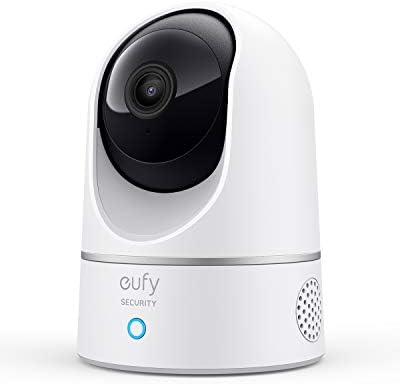
The eufy E220 is the practical choice when you mainly want to see and hear your dog. It offers 2K video, pan-and-tilt movement, night vision, motion tracking, and two-way audio. Its local-storage options can also appeal to people who do not want every useful feature tied to a monthly cloud plan.
Because it is not a dog-specific device, it does not toss treats or interpret every alert through a pet-care lens. That simplicity can be an advantage. You get a capable room camera at a lower price, then decide how much motion detection and recording you actually need.
Prices, app features, and subscriptions change. Use the comparison table to narrow your choices, then check each current product listing and app plan before buying.
Set Up a Dog Camera Without Stressing Your Dog
Install the camera while you are home. Let your dog investigate it without forcing an approach, then reward calm behavior away from the device. Watch for indicator lights, motor sounds, and speaker volume. A camera that swivels or launches treats may be startling even when the product is working normally.
Run a short test from another room. Check the view during daylight and after dark, then walk through the areas your dog normally uses. Secure power cords so they cannot be chewed or pulled. Do not place the camera where your dog can knock it down, and keep treat dispensers away from heat and humidity.

Start with broad notifications, then narrow them. Too many alerts make it tempting to stop looking at all of them. If possible, create activity zones that exclude a television, moving curtain, or busy window. During the first week, note when your dog barks, paces, rests, eats, and visits the door. The pattern is more informative than a single dramatic clip.
Avoid using the speaker to correct behavior from a distance. A disembodied reprimand can increase uncertainty without showing the dog what to do instead. If the camera reveals repeated barking, chewing, or pacing, use the footage to guide a training plan and changes to the dog’s routine.
Privacy, Notifications, and Subscription Costs
An indoor camera watches people as well as pets. Use a unique password, enable two-factor authentication when available, and install firmware and app updates. Review who can access the feed, especially if several family members share an account. Turn the camera off or use a physical privacy mode when people expect not to be recorded.
Point the lens only at the area you need. Avoid bathrooms, guest sleeping areas, computer screens, and windows that capture neighboring homes. If a walker, sitter, cleaner, or visitor may enter the room, tell them the camera is present. Local laws vary, particularly for audio recording, so check the rules where you live.
Compare the real first-year cost instead of the shelf price alone. Add any required subscription, memory card, local-storage hub, and replacement treats. Read which alerts remain available without a paid plan. A less expensive camera with the right basic features is a better buy than a premium model whose most important functions sit behind a fee you do not want.
Also consider how long the company supports the app. A connected camera depends on software, security updates, and servers. Buy from a manufacturer with a clear support history, keep the receipt, and revisit privacy permissions periodically.
When Monitoring Reveals a Problem
Call a veterinarian promptly for repeated vomiting, significant pain, a seizure, or repeated attempts to urinate without producing urine. Collapse, trouble breathing, a seizure lasting more than five minutes, or repeated seizures need emergency care now. A camera alert cannot tell you how serious the problem is.
A camera can show that something is wrong, but it cannot examine your dog. Repeated pacing, barking, drooling, destruction near exits, or escape attempts whenever your dog is alone may suggest separation-related distress. Save a few representative clips and share them with your veterinarian or a qualified behavior professional.
Final Thoughts From a Veterinarian
If clips show repeated pacing or panic whenever you leave, save a few and ask your veterinarian for a plan. If you see collapse, trouble breathing, or repeated seizures, arrange emergency care immediately instead of waiting for another alert.
This article is for educational purposes only and is not a substitute for professional veterinary care. Always consult a licensed veterinarian regarding your pet’s health and nutritional needs. As an Amazon Associate, Vet Explains earns from qualifying purchases.
Was the article helpful?